

9 Free Marketing Tools to Get More Done

Updated: Sep 2, 2020

How often are you asked to write copy, design a graphic or fix a line of code in an email? How often do you do these tasks in the same day? More often than you think.
As new technology and trends emerge, there is more to do in marketing and not enough resources to accomplish everything. So, how do we get it all done? Tools, my friend.
Here are a few free marketing tools that I shared on this week's episode of the Marketing, Optimized podcast.
Design
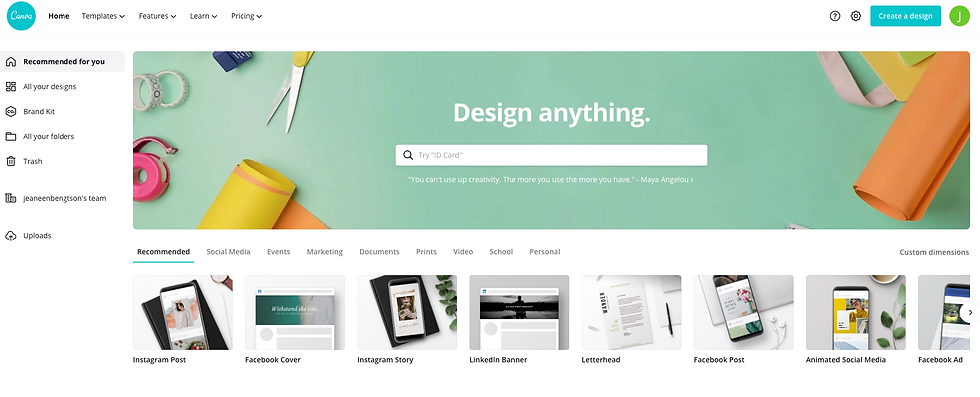
Canva
This is easily one of my favorite tools of all time. Canva is a web-based graphic design tool that I discovered in 2016 and I've been using it ever since. Canva offers hundreds of templates, design elements, and images in every size and format you can imagine.
They also have resources that cover font combinations, color wheel, palettes, and more, as well as a design school to further develop your design skills.
Canva offers both free and paid accounts. Sign up here.

PhotoPea
When you need to retouch an image, remove an object, or edit a background, you need a more complex photo editor than what is preloaded on your computer. PhotoShop is typically the editor of choice for many marketers, but if you don't have access to PhotoShop or haven't made the investment, don't fret.
PhotoPea is an in-browser editor that offers many similar features as PhotoShop. From the layout to the tool selection and functions, PhotoPea is a free tool that gives PhotoShop a run for its money.

Unsplash, Pexels, Pixabay
If you have ever created content for social or web, you know there are never enough images in your library. This is especially true for small teams that may not have a budget for photography. Enter royalty-free images.
Unsplash, Pexels, and Pixabay are free websites that have vast collections of photography that don't require attribution. There is some overlap in content, but I regularly use all three to find high-quality images. As a bonus, Pexels and Pixabay also have free videos though the selection is far more limited than their photography.
Project Management

Asana
It's time to move past the handwritten to-do lists and begin using a project management tool like Asana. Whether you prefer to organize projects by cards, lists, or Gantt charts, Asana can do it all.
You can assign tasks, link project tasks, upload files, add comments, track deadlines, and so much more. It's a beast of a tool in the free version, and the paid version offers more robust features and integrations.

Pastel
Remote teams or not, chances are you have had to deliver or receive creative feedback through an email, phone call, or text message. It's not easy!
When I say "shift the headline over a hair" I mean a centimeter. When the designer sees "a hair" they think a millimeter. Revision after revision. It's exhausting. But, there's a better way.
Pastel is a tool that allows teammates to simultaneously provide feedback on creative in real-time. The process is simple:
1) The designer uploads a creative file or hyperlink to a web file to Pastel and requests feedback from teammates.
2) Teammates are notified that the creative is ready to review. Once in the Pastel project, team members can click on specific areas of the creative to make comments for the designer.
3) The designer receives feedback and has the option to respond to comments or upload revised creative.
4) Team members can view new creative with original notes and mark resolved or add new comments.
Pastel offers free and paid accounts. Sign up here.
Copywriting

Grammarly
If you do any writing at all (internal emails count!), you need to install the Grammarly browser extension. Grammarly is a writing assistant that scans your content for spelling and phrasing errors, tone, readability, and more. It grades your writing on a scale of 0 (yikes) to 100 (perfect).
A big, huge caveat here. You need to be at peace with an Oxford comma. Otherwise, you will never achieve that perfect score and you will forever have a red circle following you around every time you write.

Word-to-Use
I'm giving away my top-secret copywriting tool today. You're welcome.
Words-to-Use is a word reference tool that provides adjectives, nouns, verbs, negative words, phrases, similes, and quotes around various subjects. When I start copywriting for a campaign, I come here to get inspiration for the particular topic I'm covering. It's really helpful to get you outside of your normal vocabulary.
SEO

Source: Yoast.com
Yoast
SEO can be complex, but thankfully the Yoast plug-in for WordPress makes executing it a bit easier. This free tool can help you with the technical side of SEO like permalink URLs and sitemaps, as well as the content like keyword ranking and meta-descriptions.
I find the content analysis to be the most useful part of Yoast. After you write your copy, plug in a target keyword, and Yoast will scan your content and give you recommendations on keyword usage, links, copy length, and more. A color-coded system of green, orange, or red will indicate how well your content ranks for the keyword you've chosen.
Yoast offers free and paid plans. Get started here.

Answer the Public
Gone are the days of stuffing your webpages with keywords, hoping to drive some poor soul to a page on your website that is almost unintelligible and certainly doesn't convert. Now, it's all about user intent and aligning your content to what your audience is searching for right now.
Answer the Public is a really interesting tool to help uncover user-intent around brands, topics, and products. Simply type in a one or two, and Answer the Public provides questions, prepositions, comparisons, and related words and searches to the terms you provided.
Say you have a booth at a Jazz Festival in the post-pandemic world. You know it would be extremely difficult to rank for the terms jazz festival, so you head to Answer the Public and see that people are asking what can I bring to a jazz festival. You create a blog that highlights must-bring items for festival-goers and enjoy some new website traffic.
Answer the Public provides three free daily searches and offers paid plans. Start searching here.
--------
DISCUSS: Have a favorite tool that I missed here? Tell me in the comments.


Comments